Send Non-Printable Keys
Serial Port
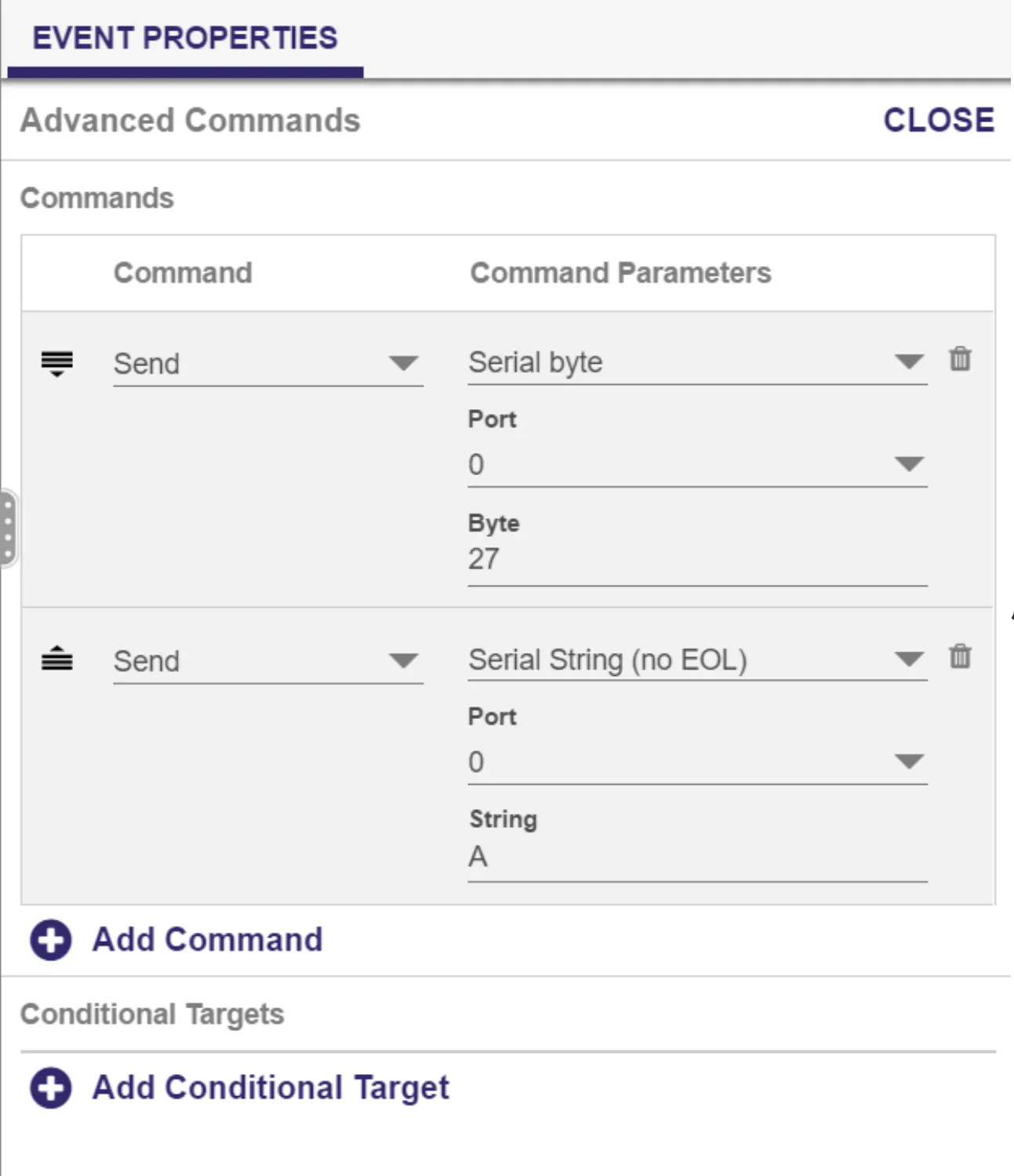
Non-printable keys (e.g., function keys, ENTER, CTRL, ALT, ESC) can be sent via the player's serial port. To do this, use the Send -- Serial byte command to send the decimal value of the desired key. For example, if you need to send the serial string ESC A to turn on your display:
Create a presentation with an Advanced Zone.
Open the Media State or Event where you want to send the command.
Click the Advanced tab.
Use the Add Command button to add two commands.
Set the first Command to Send and the Command Parameters to Serial byte.
Set Port to 0 (this works for most standard serial devices) and set Byte to 27 (the decimal value for ESC).
Set the second Command to Send and the Command Parameters to Serial string (no EOL).
Set Port to 0 and Byte to the letter A.
Keyboards
BrightSign players can accept input from non-printing characters on a keyboard. For example, to have the space bar trigger an event, you would enter "<sp>" as the input value for the Keyboard event in your BrightSign Author or BrightAuthor Classic project.
To do this:
Select the code in the chart below that corresponds to the keyboard character you need.
Add a Keyboard Event to your content and enter the selected code in the Specify keyboard input field field.
Codes
Key | Code | Key | Code |
|---|---|---|---|
Space | <sp> | F1 | <f1> |
Left arrow | <la> | F2 | <f2> |
Right arrow | <ra> | F3 | <f3> |
Up arrow | <ua> | F4 | <f4> |
Down arrow | <da> | F5 | <f5> |
Return | <rn> | F6 | <f6> |
Enter | <en> | F7 | <f7> |
Escape | <es> | F8 | <f8> |
Page Up | <pu> | F9 | <f9> |
Page Down | <pd> | F10 | <f10> |
Backspace | <bs> | F11 | <f11> |
Tab | <tb> | F12 | <f12> |
Insert | <in> | F13 (prnt scrn) | <f13> |
Del | <de> | F14 (Scrl Lck) | <f14> |
Home | <ho> | F15 (Pause-Break) | <f15> |
End | <ed> |
|
|
See Send Non-Printable Keys in BrightAuthor Classic for BrightAuthor Classic instructions.