BSN.Cloud Ports & URLs
Below is the list of ports and URLs that our products use to communicate with BSN.Cloud services.
BrightSign hosts in AWS and uses Cloudflare. If you need a list of the Cloudflare IP addresses for your network policies, see https://www.cloudflare.com/en-gb/ips/
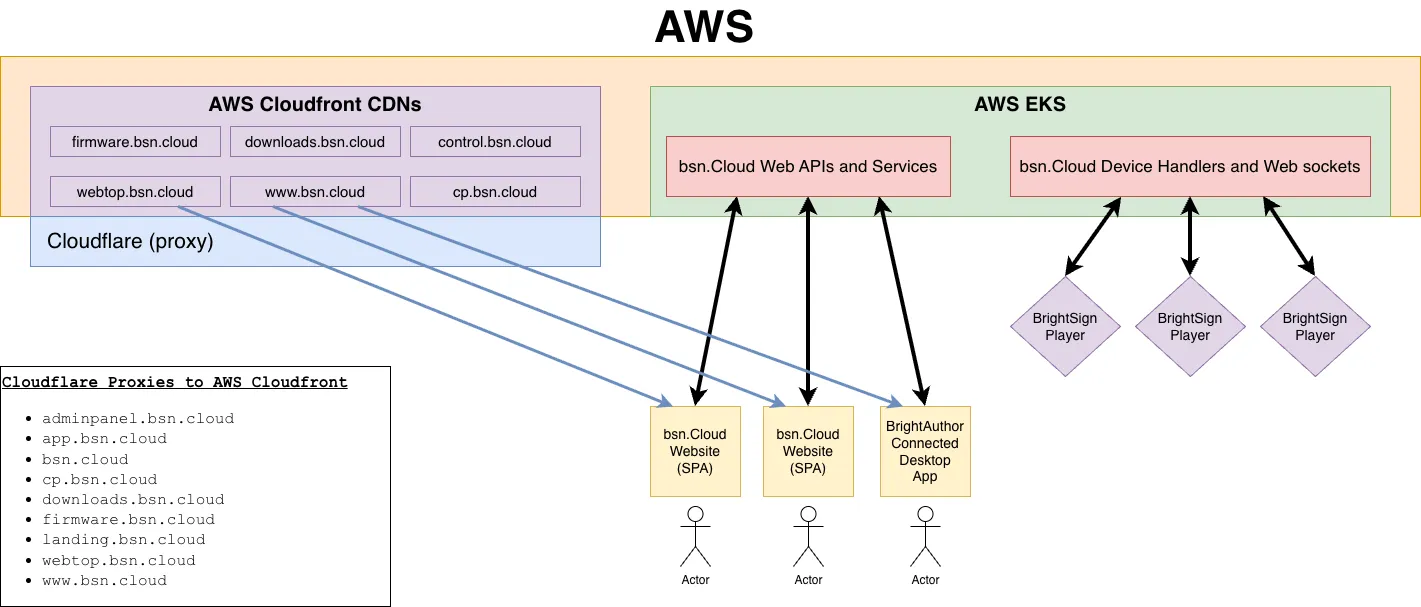
The Cloudflare section below explains what is protected in BSN.Cloud by Cloudflare
For simplicity, you should permit anything from bsn.cloud with a wildcard: *.bsn.cloud
Player Access Requirements
All access rules must be defined for outgoing connections only.
Domain | Ports & Protocols | Control & Control Plus | Author Plus |
|---|---|---|---|
provision.brightsignnetwork.com | 443: HTTPS | Optional (for B-Deploy) | Optional (for B-Deploy) |
provision.bsn.cloud | 443: HTTPS | Optional (for B-Deploy) | Optional (for B-Deploy) |
handlers.bsn.cloud | 443: HTTPS | Optional | Required |
ws.bsn.cloud | 443: HTTPS, WSS | Required | Required |
certs.bsn.cloud | 443: HTTPS | Required | Required |
certs.brightsignnetwork.com | 443: HTTPS | Required | Required |
time.bsn.cloud | 80, 123: HTTP, NTP | Required | Required |
firmware.bsn.cloud | 443:HTTPS | Required | Required |
content.bsn.cloud | 443:HTTPS | Optional | Required |
*.mc.bsn.cloud | 443:HTTPS | Optional (player hotfixes) | Optional (player hotfixes) |
crashes.brightsignnetwork.com | 443: HTTPS | Required | Required |
services.brightsignnetwork.com | 80: HTTP 443: HTTPS | Required | Required |
bsncloud.s3.amazonaws.com | 443: HTTPS | Not Required | Required |
api.qrserver.com | 443: HTTPS | Optional (for activation by QR) | Optional (for activation by QR) |
goqr.me | 443: HTTPS | Optional (for activation by QR) | Optional (for activation by QR) |
BrightSign Author Access Requirements
All access rules must be defined for outgoing connections only.
Domain | Ports & Protocols | Control & Control Plus | Author Plus |
|---|---|---|---|
bsn.cloud | 443: HTTPS | Required | Required |
app.bsn.cloud | 443: HTTPS | Required | Required |
downloads.bsn.cloud | 443: HTTPS | Required | Required |
auth.bsn.cloud | 443: HTTPS | Required | Required |
provision.brightsignnetwork.com | 443: HTTPS | Required | Required |
provision.bsn.cloud | 443: HTTPS | Required | Required |
ws.bsn.cloud | 443: HTTPS | Required | Required |
api.bsn.cloud | 443: HTTPS | Required | Required |
firmware.bsn.cloud | 443:HTTPS | Required | Required |
rp.bsn.cloud | 443: HTTPS | Not required | Required |
analytics.bsn.cloud | 443: HTTPS | Required | Required |
api.brightsignnetwork.com | 443: HTTPS | Not required | Optional (for presentation import from BSN.com) |
bsncloud.s3.amazonaws.com | 443: HTTPS | Required | Required |
bsnm.s3.amazonaws.com | 443:HTTPS | Not required | Optional (for presentation import from BSN.com) |
*.netsuite.com | 443: HTTPS | Required | Required |
brightsign.biz | 443: HTTPS | Required | Required |
docs.brightsign.biz | 443: HTTPS | Required | Required |
443: HTTPS | Required | Required |
Chromium 87+ and Certificate Validation Endpoints
In Chromium 87 (BOS 8.5 and 9.0) and later, inability to communicate with CRL and OSCP endpoints became a blocking action. That is, if the browser reaches out to these endpoints and never hears back, it does not complete the validation process. Any response from those endpoints, even an unsuccessful one, allows the process to continue. This was not true in Chromium 69 (BOS 8.4 and below). For more information, see these pages about Online Certificate Status Protocol and the Certificate revocation list.
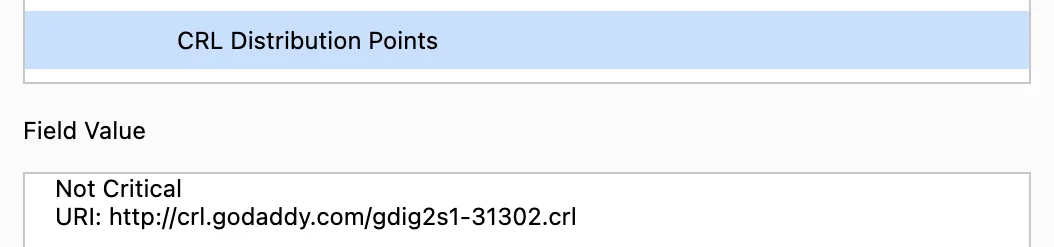
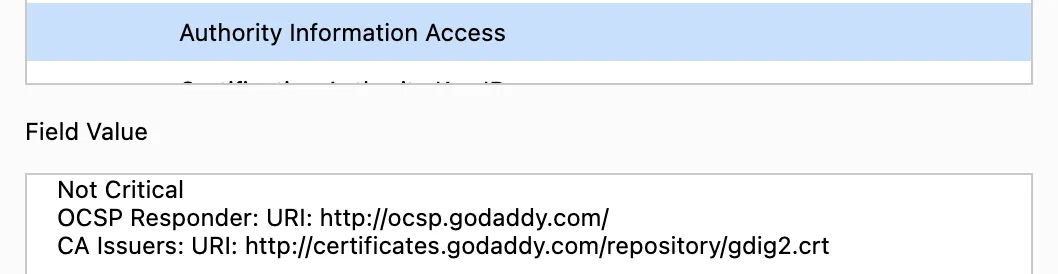
To avoid this issue, you must add a whitelist for those endpoints to the certificate vendor. The example below uses Google Chrome and a BSN.Cloud certificate to open the certificate and find the endpoints. Note that players need access to port 80 in order to whitelist URLs using this method:
- CRL Distribution Points:
- Authority Information Access > OCSP Responder:
Cloudflare
This diagram describes Cloudfront CDNs and IPs, and what is protected in BSN.Cloud by Cloudflare: