LG AKB73975728 Remote Control
The LG AKB73975728 IR remote control can be used with BrightSign players built on the LG "Thor" platform. Unlike the RC-1002 Remote Control, it does not require a separate USB or 3.5 mm IR adapter; button presses are received through the display's built-in IR sensor (IR-in).
The remote transmits standard NEC infrared codes (the player can decode them as NEC or NEC32). The Keycodes section below contains the unique hexadecimal codes that each button sends over IR when pressed.
Layout
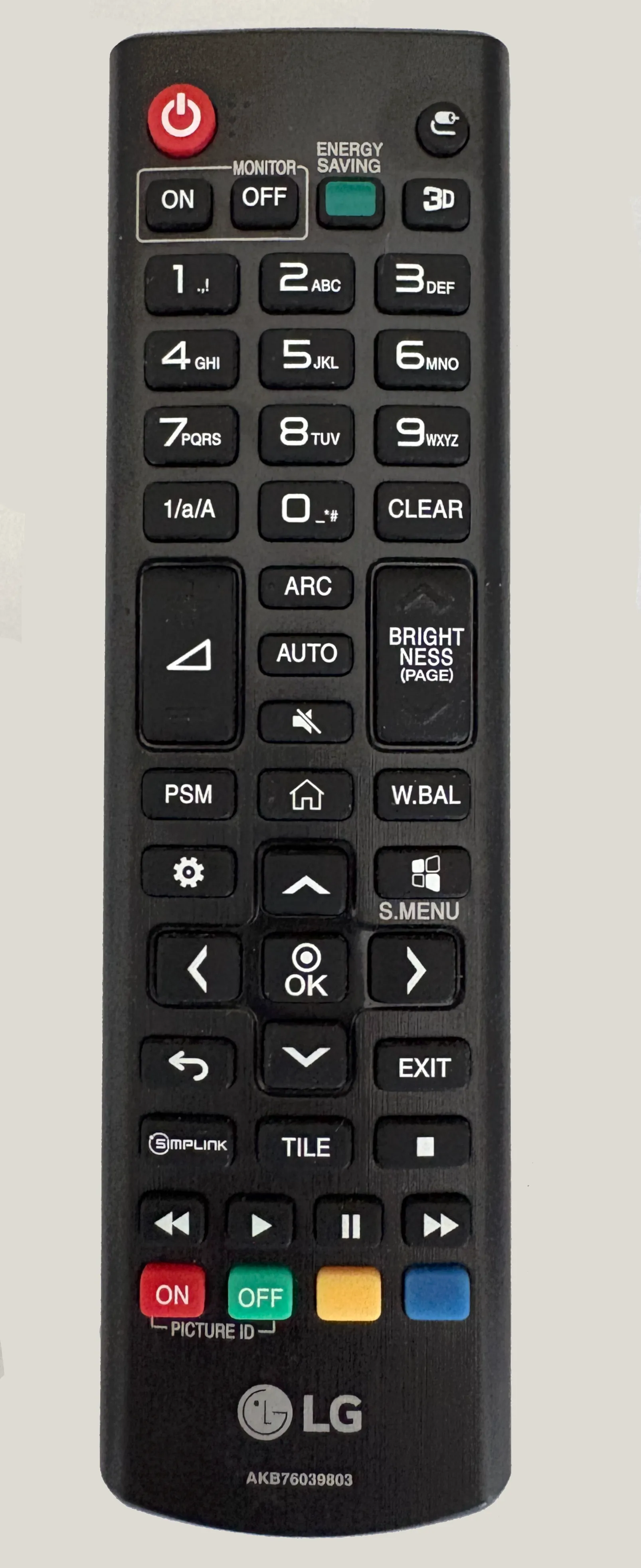
Keycodes
All buttons share the same NEC custom code: 04FB. Each row lists the button's unique code (NEC command byte), the full decimal value reported for the NEC encoding, and the equivalent NEC32 code.
Power & Source
Unique Code | Button Description | Decimal Value | NEC32 code |
|---|---|---|---|
0x0B | INPUT | 326411 | 0xF40BFB04 |
0xF0 | TV/RAD | 326640 | 0x0FF0FB04 |
0x7E | SIMPLINK | 326526 | 0x817EFB04 |
0x95 | Energy Saving | 326549 | 0x6A95FB04 |
0x91 | AD | 326545 | 0x6E91FB04 |
Numbers
Unique code | Button | Decimal value | NEC32 code |
|---|---|---|---|
0x11 | 1 | 326417 | 0xEE11FB04 |
0x12 | 2 | 326418 | 0xED12FB04 |
0x13 | 3 | 326419 | 0xEC13FB04 |
0x14 | 4 | 326420 | 0xEB14FB04 |
0x15 | 5 | 326421 | 0xEA15FB04 |
0x16 | 6 | 326422 | 0xE916FB04 |
0x17 | 7 | 326423 | 0xE817FB04 |
0x18 | 8 | 326424 | 0xE718FB04 |
0x19 | 9 | 326425 | 0xE619FB04 |
0x10 | 0 | 326416 | 0xEF10FB04 |
0x32 | Dash (number/text switch) | 326450 | 0xCD32FB04 |
0x1A | Q.VIEW | 326426 | 0xE51AFB04 |
0x53 | LIST | 326483 | 0xAC53FB04 |
0x1E | FAV | 326430 | 0xE11EFB04 |
Volume & Page
Unique code | Button | Decimal value | NEC32 code |
|---|---|---|---|
0x02 | Vol Up | 326402 | 0xFD02FB04 |
0x03 | Vol Down | 326403 | 0xFC03FB04 |
0x09 | Mute | 326409 | 0xF609FB04 |
0x00 | Page Up | 326400 | 0xFF00FB04 |
0x01 | Page Down | 326401 | 0xFE01FB04 |
Navigation
Unique code | Button | Decimal value | NEC32 code |
|---|---|---|---|
0x40 | Up | 326464 | 0xBF40FB04 |
0x41 | Down | 326465 | 0xBE41FB04 |
0x07 | Left | 326407 | 0xF807FB04 |
0x06 | Right | 326406 | 0xF906FB04 |
0x44 | OK | 326468 | 0xBB44FB04 |
0x28 | Back | 326440 | 0xD728FB04 |
0x5B | Exit | 326491 | 0xA45BFB04 |
Menus & Smart
Unique code | Button | Decimal value | NEC32 code |
|---|---|---|---|
0x43 | SETTINGS | 326467 | 0xBC43FB04 |
0x45 | Q.MENU | 326469 | 0xBA45FB04 |
0x7C | SMART | 326524 | 0x837CFB04 |
0x42 | MY APPS | 326466 | 0xBD42FB04 |
0x20 | Text | 326432 | 0xDF20FB04 |
0x21 | T.OPT | 326433 | 0xDE21FB04 |
0xAA | INFO | 326570 | 0x55AAFB04 |
0xAB | GUIDE | 326571 | 0x54ABFB04 |
Playback
Unique code | Button | Decimal value | NEC32 code |
|---|---|---|---|
0x8F | Rew | 326543 | 0x708FFB04 |
0xB0 | Play | 326576 | 0x4FB0FB04 |
0xBA | Pause | 326586 | 0x45BAFB04 |
0x8E | FF | 326542 | 0x718EFB04 |
0xBD | REC/* | 326589 | 0x42BDFB04 |
0xB1 | Stop | 326577 | 0x4EB1FB04 |
Color keys
Unique code | Button | Decimal value | NEC32 code |
|---|---|---|---|
0x72 | Red | 326514 | 0x8D72FB04 |
0x71 | Green | 326513 | 0x8E71FB04 |
0x63 | Yellow | 326499 | 0x9C63FB04 |
0x61 | Blue | 326497 | 0x9E61FB04 |
Picture & Display
Unique code | Button | Decimal value | NEC32 code |
|---|---|---|---|
0x79 | ARC | 326521 | 0x8679FB04 |
0x4D | PSM | 326477 | 0xB24DFB04 |
0x5F | White Balance | 326495 | 0xA05FFB04 |
0x99 | Auto | 326553 | 0x6699FB04 |
0x2F | Clear | 326447 | 0xD02FFB04 |
0x3F | S.Menu | 326463 | 0xC03FFB04 |
0x7B | Tile | 326523 | 0x847BFB04 |
0xC4 | Monitor On | 326596 | 0x3BC4FB04 |
0xC5 | Monitor Off | 326597 | 0x3AC5FB04 |
Programming the Controller
You can program the controller through BrightSign Author, Bright Author Classic, or BrightScript:
- To use these commands in BrightAuthor:connected, see Remote Input Event
- To use these commands in BrightAuthor Classic, see Remote Input
- To program the controller in BrightScript, see roIRReceiver.
- When listening for these codes with roIRReceiver, specify the NEC or NEC32 encoding and match on the decimal value (NEC) or the hexadecimal NEC32 code listed above. Holding a button down produces a roIRDownEvent, followed by repeating roIRRepeatEvents while the button is held, and a roIRUpEvent when the button is released.