App URL/CMS URL
In the hands-on example, a player was manually provisioned by physically copying a Player App to the player’s storage device. Since the Default Setup File was acceptable, provisioning of the player did not require a new Setup File to be explicitly applied.
While manual provisioning is a very straightforward process, it poses challenges when multiple players are involved, players are in remote or hard-to-access locations, and/or the content needs to be updated frequently. Remote provisioning can therefore be highly beneficial in many scenarios.
The recommended method for partner provisioning of players, either manually or remotely, is through the use of Setup Files which can be created via BrightSign Control or Author.
CMS URL/App URL
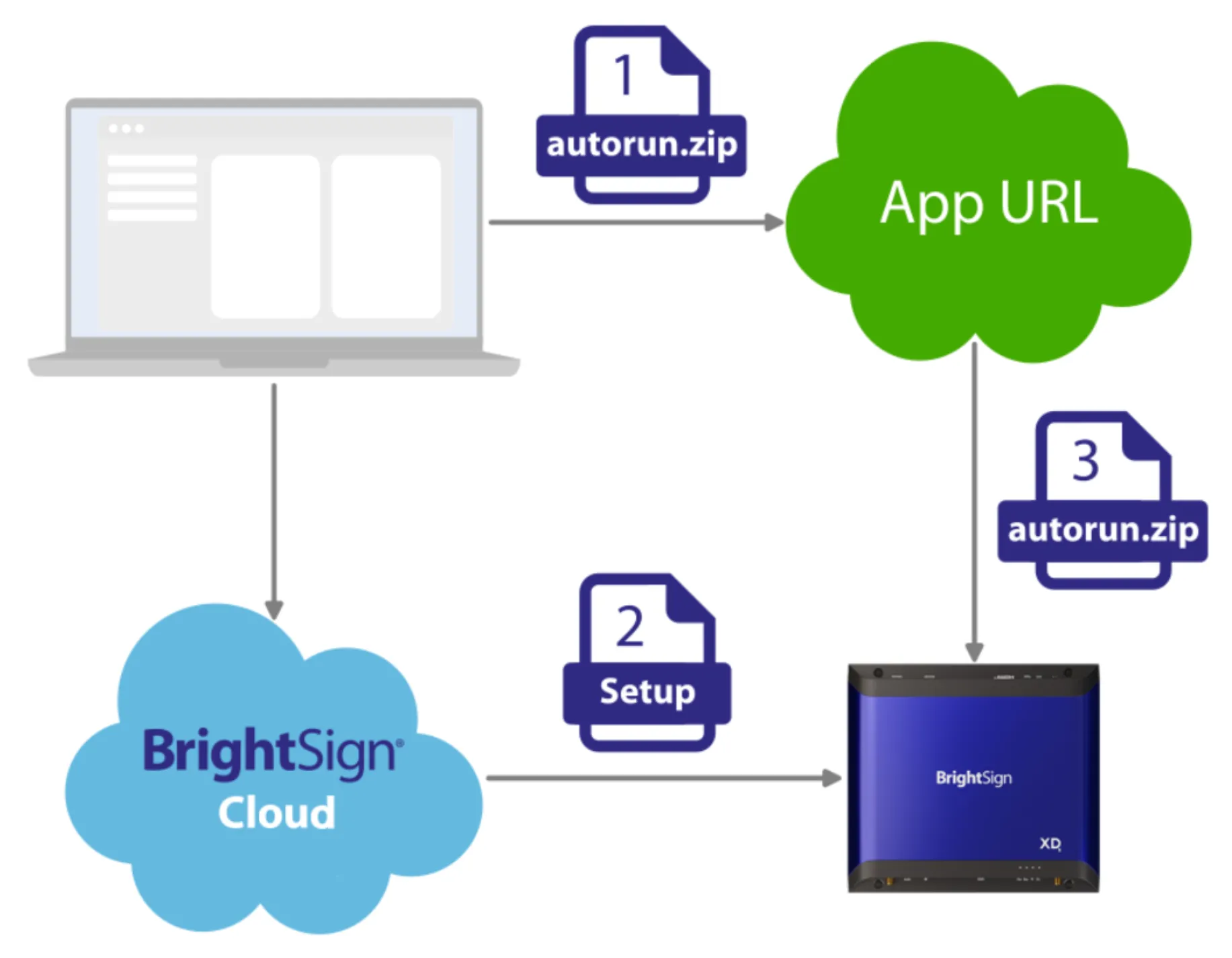
The Publishing Mode is one of the important settings included in a Setup File, and the CMS URL (also known as App URL) Publishing Mode is an effective way to remotely get content onto players. More details of this Setup can be found here, but a summary is as follows:
- The desired autorun.brs or autorun.zip file is uploaded to a player-accessible URL. The autorun.zip file includes the essentials (autozip.brs and autorun.brs) and, if desired, the presentation file and associated content files. The URL path to the autorun.brs or autorun.zip file is designated as the CMS URL/App URL (an example is available at https://www.brightsign.biz/examples/autorun.zip which you may use).
- The player is configured with the CMS URL/App URL. There are several ways to do this:
- A CMS URL/App URL can be applied directly to a player or group of players in BrightSign Author (in the Provision screen) or BrightSign Control. You will be shown one way to do this in the next section.
- Create a CMS URL/App URL Setup using BrightSign Author or Control (see App URL Setup).
- The Setup File contains info about the CMS URL/App URL.
- The Setup File can be remotely applied to a player or group of internet-connected players.
- Players download the autorun.brs or autorun.zip file from the CMS URL/App URL specified in the Setup File.
- Player(s) configured for a CMS URL/App URL will, upon booting, download the autorun.brs or autorun.zip file from the specified CMS URL/App URL. If the file is an autorun.zip file containing an autozip.brs file, the player will unzip that file. The player will then reboot, and then run the autorun.brs file.
Next, we will walk through another hands-on example in which we provision a player directly to use an CMS URL/App URL.
Next - Example (App URL) >Next - Example (App URL) >