RSS Title & Description
This page / section pertains to BrightAuthor Classic, our legacy app. BrightSign Author is our latest app for managing content and players.
Development of BrightAuthor Classic has largely ceased and the app will eventually be deprecated and replaced with BrightSign Author.
Versions 3.5 and later of BrightAuthor Classic support displaying both title and description for standard text RSS feeds as well as media RSS (MRSS) feeds.
When a BrightSign player displays an RSS feed, it displays the information in the description field of each item, not the title. To display the title, or both the title and description, use a plugin that you attach to the RSS feed when you add it, or play the RSS feed in the Live Text widget (which lets you display both the title and the description).
This page describes how to use a BrightAuthor Classic plugin to display both the title and the description.
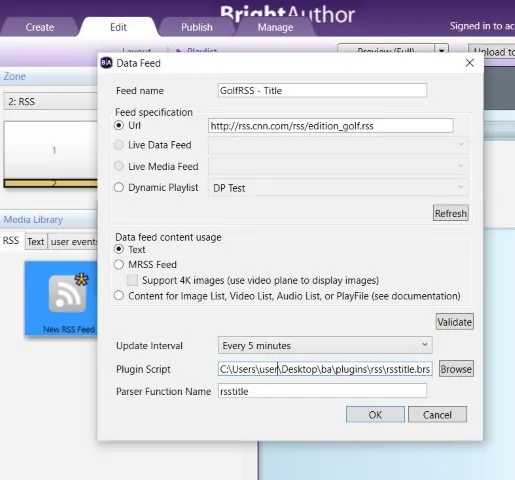
Directions
- Drag the New RSS Feed widget into your Ticker zone.
- Enter the Feed name.
- Select Url under Feed Specification and add your RSS URL.
- Click Browse next to the Plugin Script field and choose either the RSStitle or RSSboth plugin.
- Enter name of the plugin in Parser Function Name: "rsstitle" or "rssboth". Note that, if the function name doesn't match what's inside the plugin, the plugin won't run.
Note: You can use the same plugin with multiple feeds or use different plugins.