Plugins & Custom Autoruns
3 min
This page / section pertains to BrightAuthor Classic, our legacy app. BrightSign Author is our latest app for managing content and players.
Development of BrightAuthor Classic has largely ceased and the app will eventually be deprecated and replaced with BrightSign Author.
Plugins and custom autoruns can be added to BrightAuthor Classic presentations. Plugins and custom autoruns let you add functionality to a player:
- A custom autorun allows you to change the app's standard behavior to support a special feature by creating a complete BrightScript presentation file. It is usually created by editing the standard autorun (you can get the standard autorun by publishing a project to local storage). Your custom autorun must match your version of BrightAuthor Classic.
- A plugin allows you to add modules of custom functionality to your presentation. Plugins tend to be easier to update with new versions of BrightAuthor Classic and OS than custom autoruns. Plugins are also written using BrightScript.
To add a plugin or custom autorun to your presentation:
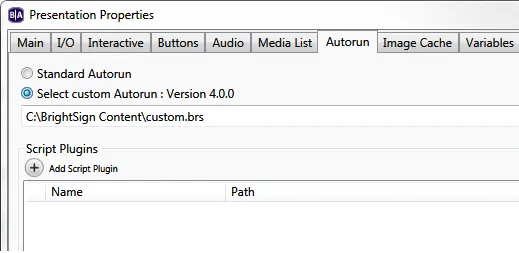
- Go to File > Presentation Properties > Autorun.
- To add a plugin, click Add Script plugin, then locate and select your .brs file.
- To add a custom autorun, choose Select custom Autorun, then locate and select your .brs file.
- To use the custom autorun or plugin in your presentation, publish it via the Publish tab.