Download & Edit a Presentation from BSN
This page / section pertains to BrightSign Network (often abbreviated BSN), our legacy cloud platform. Our latest cloud platform is BSN.Cloud. Development of BSN has largely ceased and the platform will eventually be deprecated and replaced with BSN.Cloud.
BrightAuthor Classic versions 3.4.0.9 and later allow you to download presentations from BSN (those presentations must have been uploaded after this version). After you download a presentation, you can edit it in BrightAuthor Classic and upload it again to BSN.
To download a presentation:
- In BrightAuthor Classic, sign in to BSN (Tools > Sign in to BrightSign Network).
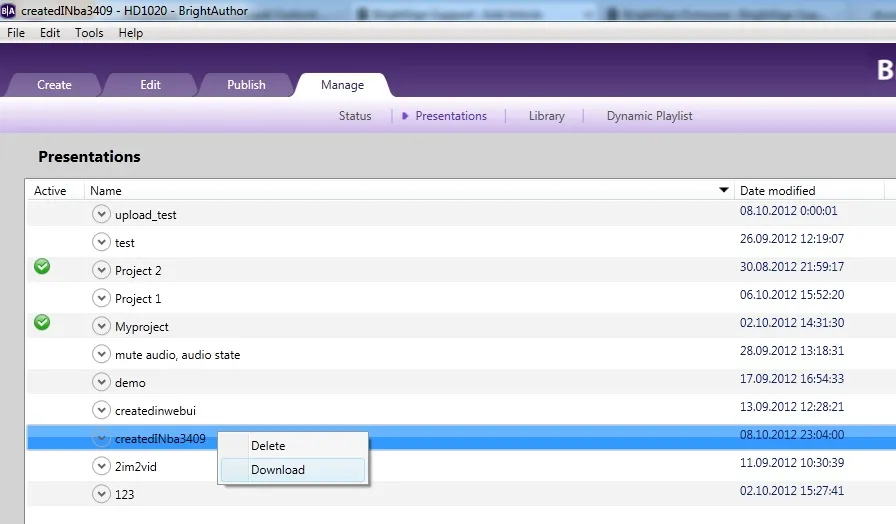
- Go to Manage > Presentations.
- Right-click the presentation you wish to download and select Download.
If a presentation was created in Web UI, you can retrieve and modify it using the Edit tab in the Web UI.
The following features are currently not supported:
- You can't use BrightAuthor Classic to download presentations that were created in the Web UI.
- You can't edit BrightAuthor Classic presentations in the Web UI (these presentations are marked with a lock icon).
Avast antivirus may cause problems with BSN presentation downloads. To work around this issue, right-click on the Avast icon in the toolbar and select Avast shields control > Disable for some time, then download again.