Add Video to a BrightWall Presentation
This page / section pertains to BrightAuthor Classic, our legacy app. BrightSign Author is our latest app for managing content and players.
Development of BrightAuthor Classic has largely ceased and the app will eventually be deprecated and replaced with BrightSign Author.
The process of creating a video playlist for a BrightWall will differ depending on whether you created a Regular or StretchedRegular or Stretched presentation.
Regular BrightWall
Each screen in a video wall has a distinct playlist. You can switch among screens by selecting them in the Screen section.
To create a regular BrightWall, you will need to add a different video file (or Streaming/Live Video state) to each screen. The Media Library of a Regular BrightWall has special properties that help streamline playlist creation:
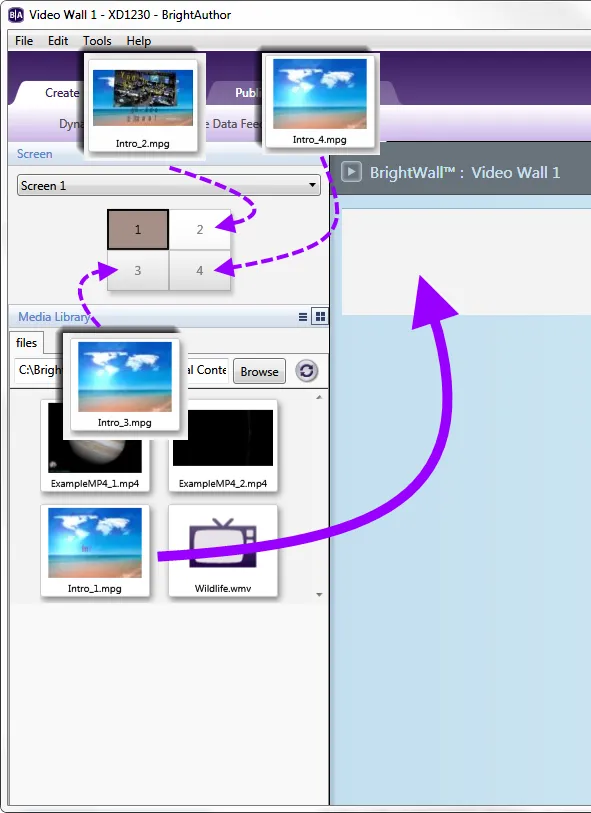
- A video with a file name in the format “VideoName_Number” appears only in the Media Library of the screen corresponding to its number.
- Adding a video with a “VideoName_Number” file name to a screen will add all other videos with the same format to their respective screen playlists. This behavior will only occur if the quantity of “VideoName_Number” files corresponds to the number screens in the BrightWall presentation.
Your BrightWall project consists of four screens. The video is split into four files, each file representing ¼ of the entire wall: “Intro_1.mpg”, “Intro_2.mpg”, “Intro_3.mpg”, and “Intro_4.mpg”. Only “Intro_1” will appear in the Media Library of Screen 1. Adding “Intro_1” to Screen 1 will automatically add “Intro_2” to Screen 2, “Intro_3” to Screen 3, and “Intro_4” to Screen 4. If your BrightWall project is expanded to six screens, then adding “Intro_1” will not affect the playlists of the other screens because there are only four “Intro” video files.
Stretched BrightWall
The entire video wall has the same playlist. Adding a video file, Streaming VideoStreaming Video, Live VideoLive Video, or RF InputRF Input to the playlist will split the video among the screens during playback.