Add a Flickr Photostream
3 min
This page / section pertains to BrightAuthor Classic, our legacy app. BrightSign Author is our latest app for managing content and players.
Development of BrightAuthor Classic has largely ceased and the app will eventually be deprecated and replaced with BrightSign Author.
Follow the steps below to add a Flickr Photostream to your BrightAuthor Classic playlist using a Media RSS (MRSS) state (Flickr Albums are not currently supported).
Find the Photostream URL
You will need the URL of your Flickr MRSS feed. To find it:
- Go to the Photostream page of your Flickr account.
- Paste the URL of your Photostream page into the field and select Find. The page will return your id below
- Replace "XXXXXX" in the following URL with your id. This is the URL for your Photostream MRSS feed. For example, http://api.flickr.com/services/feeds/photos\_public.gne?id=XXXXXX&lang=en-us&format=rss\_200
Add a MRSS State
- Go to Edit > Playlist.
- Select the Other tab under Media Library.
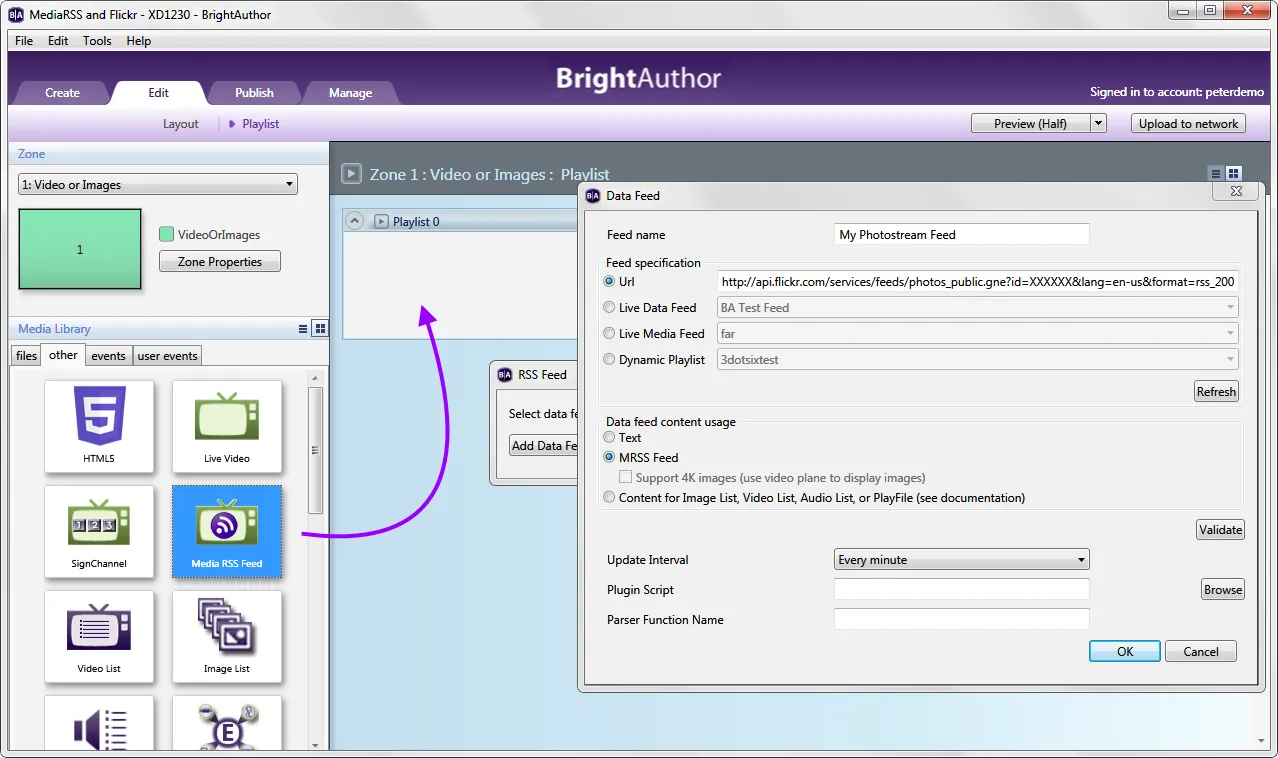
- Drag and drop the Media RSS Feed icon into your playlist to open the RSS Feed window.
- Select Add Data Feed.
- Enter a Feed Name.
- Under Feed Specification, select Url and enter the URL for your Photostream MRSS feed.
- Under Data feed content usage, select MRSS Feed.
- Enter an Update Interval to determine how frequently the player should check the Photostream MRSS feed for updates.
- Select Validate to ensure that you entered the feed URL correctly, then select OK.